Intro
When configuring Route-Failover there may be situations where it appears to work as expected but when doing more in-depth testing it may be that some parts of the fail-over may not work as expected. One of the most common problems is that the recovery after a fail-over incident may not work, the traffic does not return to the primary route even though it is back up and should be working. This KB will provide an example of a RFO setup and when this issue is encountered and how to solve it.
The Example Setup
An example of a route fail-over setup is shown in the picture below.
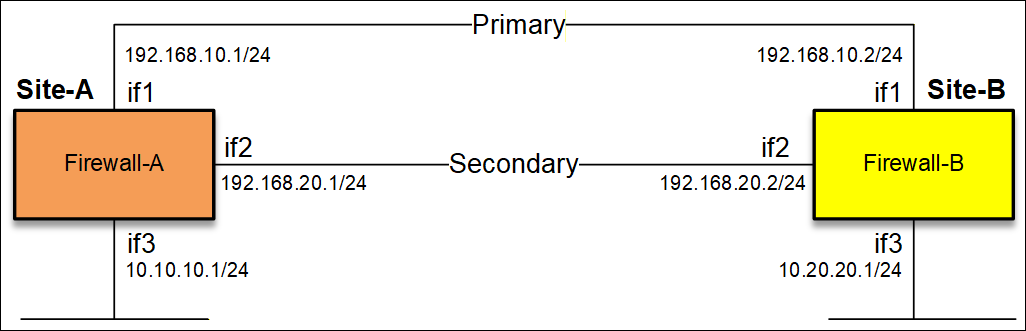
There are two sites and the network 10.10.10.0/24 and 10.20.20.0/24 should be reachable by going through either If1 or if2. To keep things simple we will only use RFO on the primary route.
Base Routing Tables
Before RFO is configured, the routing table on Site-A look as follows:
1# Route if1 192.168.10.0/24 Metric=100 Monitor=No
2# Route if2 192.168.20.0/24 Metric=100 Monitor=No
3# Route if3 10.10.10.0/24 Metric=100 Monitor=No
And on Site-B it looks as follows:
1# Route if1 192.168.10.0/24 Metric=100 Monitor=No
2# Route if2 192.168.20.0/24 Metric=100 Monitor=No
3# Route if3 10.20.20.0/24 Metric=100 Monitor=No
Now we add RFO into the mix, we want to be able to reach the 10.10.10.0/24 and 10.20.20.0/24 through if1, and if if1 is unavailable the connection should then fall back to use if2 by using RFO.
RFO Routing Tables
Site-A: RFO Routing Table:
1# Route if1 192.168.10.0/24 Metric=100 Monitor=No
2# Route if2 192.168.20.0/24 Metric=100 Monitor=No
3# Route if3 10.10.10.0/24 Metric=100 Monitor=No
4# Route if1 10.20.20.0/24 Gateway=192.168.10.2, Metric=10 Monitor=Yes Hostmon=10.20.20.1 MonitorSource=10.10.10.1
5# Route if2 10.20.20.0/24 Gateway=192.168.20.2, Metric=20 Monitor=No
Monitoring is done towards the IP address of if3 (10.20.20.1) on the remote side (Site-B).
Site-B: RFO Routing Table:
1# Route if1 192.168.10.0/24 Metric=100 Monitor=No
2# Route if2 192.168.20.0/24 Metric=100 Monitor=No
3# Route if3 10.20.20.0/24 Metric=100 Monitor=No
4# Route if1 10.10.10.0/24 Gateway=192.168.10.1, Metric=10 Monitor=Yes Hostmon=10.10.10.1 MonitorSource=10.20.20.1
5# Route if2 10.10.10.0/24 Gateway=192.168.20.1, Metric=20 Monitor=No
Monitoring is done towards the IP address of if3 (10.10.10.1) on the remote side (Site-A).
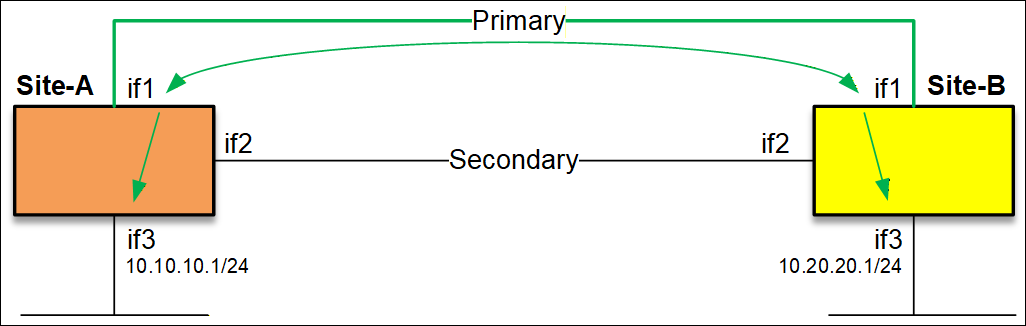
The above is the simplest possible setup, monitoring is done on the IP address of if3 on both sides (green arrows).
Route-Failover Triggers
Now, let test the current setup by e.g. disconnecting the cable of if1. This would cause the monitoring on both Site-A and Site-B to be unable to reach their monitor targets (10.10.10.1 and 10.20.20.1). A fail-over will trigger and cause traffic to move over to the secondary/backup connection over if2. So far everything is working as expected.
The routing table on each side now looks like this (we focus specifically on routes related to the RFO):
Site-A:
4# x Route if1 10.20.20.0/24 Gateway=192.168.10.2, Metric=10 Monitor=Yes Hostmon=10.20.20.1 MonitorSource=10.10.10.1
5# Route if2 10.20.20.0/24 Gateway=192.168.20.2, Metric=20 Monitor=No
Site-B:
4# x Route if1 10.10.10.0/24 Gateway=192.168.10.1, Metric=10 Monitor=Yes Hostmon=10.10.10.1 MonitorSource=10.20.20.1
5# Route if2 10.10.10.0/24 Gateway=192.168.20.1, Metric=20 Monitor=No
The primary route now has an X on it, this means that the monitoring on this route has declared that this route is malfunctioning and declared it as dead. From the firewalls perspective, it is as if the route with X does not exist at all. The Firewall will now attempt to find out where the target route is and it will find a match on if2 on both sides.
However, the Hostmonitor on both sides continue to constantly send packets over if1 (using the primary route) in the hopes to get a reply, if/when it start to get replies again, it would then declare primary route as up again (standard behavior).
Primary Comes Back Up Again
We connect the if1 cable again and wait for the primary route to be declared as up again, but for some reason nothing happens and host monitor still declares the monitor host as down. The primary route therefore still declared as dead and if2 is still used for all the traffic and here we now have a tricky situation that may not be obvious about what is happening. The below images illustrates what happens with the monitored packets.

The problem is that the monitoring packets sent from Site-A to Site-B and Site-B to Site-A is ALWAYS being sent on the route the host monitor is configured on and on Site-A the packets are dropped due the log message “Default_Access_Rule”. This message is a bit cryptic but it basically means “Dropped due to a routing error”. But why is it dropped? Lets dig deeper.
Monitoring from Site-B to Site-A (as an example) is being sent to 10.10.10.1 from 10.20.20.1. But when Site-B has the primary route as down, it knows that the 10.10.10.0/24 network is supposed to be behind the if2 interface, and when it receives packets from if1 and from source 10.20.20.1, Site-A firewalls drops the incoming monitoring packets due to the reverse route lookup detection/check.
The main reason for this is that Clavister allow the administrators full control over the setup in high (perhaps extreme) levels of detail, especially if you have a Clavister firewall on both sides, there is very little automation here.
Solution
On Site-A and Site-B we need to tell the firewalls to always allow the monitoring packets to arrive on the primary route regardless if the route is declared as down or not, otherwise the primary will never be able to be declared as up again. The easiest way to achieve that is to create a “route override” rule that always allow the monitoring source to arrive on the primary.
Under “Threat Prevention->Access Rules” create the following on the Site-A and Site-B firewalls (one on each):
Site-A:
Accept if1 10.20.20.1
Site-B:
Accept if1 10.10.10.1
This means that the firewall will always be fine with accepting these incoming source IP address on the primary route regardless if it is declared as down or not. You could say that we disable the “Default_access_rule” check related to this IP address and interface.
Alternative solution A (not recommended)
Use static routing for the monitoring hosts on the primary route on each site that is smaller/more narrow than the /24 network. Example:
Site-A:
Route if1 10.20.20.1 gateway=192.168.10.2
Site-B:
Route if1 10.10.10.1 gateway=192.168.10.1
The drawback with the routing solution is that in case the monitor hosts needs to be reachable during a fail-over situation, it would be unreachable. That is why the Access rule solution is more efficient.
Alternative solution B
A second alternative solution would be to use PBR (Policy-Based-Routing). The advantage with this solution is that you can select to “override” the “Default_access_rule” on specific services (e.g. ICMP). Without going into too much detail, the general way to use PBR is to create a new routing table with ordering <Only> then add routes towards the Primary and the monitor host target(s) in this table (without any monitoring). Then create a PBR rule saying that for monitoring traffic coming in on the Primary, should be allowed to return to the primary as well (Forward and Return would be the newly created routing table). The PBR rule can then be made very narrow to make sure it does not trigger on anything other than the monitor traffic.
Final word
This scenario is an example of how monitoring packets may be dropped. There are in some cases multiple solutions to the same problem. As an example for this scenario, if the monitor source was to be the if1 interface IP (192.168.10.1 and 192.168.10.2) it would have worked as well without the need for access rules, assuming the network behind if3 responded when packets arrive from this source IP. There may be VPN tunnels as the backup connection, further adding complexity to the setup. Some things to keep in mind:
- When Host monitor is enabled on a route, the monitor packets are ALWAYS sent on on the route the monitoring is enabled on.
- When testing RFO, always test both a fail-over from Primary to Secondary, but ALSO test that it can recover from Secondary to Primary when Primary recovers. Otherwise the impression may be that it works as expected and not notice the issue until after a real incident occurs.
- Useful CLI commands:
- Hostmon
- Routemon
- Route -lookup=<ip>
- Logsnoop -on -pattern=<ip> -num=20
Related articles
21 Oct, 2022 core arp routing
12 Apr, 2023 core proxyarp arp ipsec routing
28 Mar, 2023 ikev2 windows vpn routing splittunneling
22 Mar, 2021 core ipsec routing
11 Dec, 2025 core routing ospf ipsec
17 Jun, 2021 core ipsec routing
30 Nov, 2022 core routing
1 Jun, 2022 core routing management
25 Nov, 2022 core routing bgp
25 Sep, 2025 core routing pbr
16 Oct, 2023 howto core pbr routing netwall isp
15 Dec, 2022 core routing ospf
7 Nov, 2022 core arp log routing
6 Apr, 2023 core ripv2 routing
17 Mar, 2023 core routing rules ping icmp cli
27 Jan, 2021 core stateless routing brokenlink
13 Feb, 2023 ipsec core routing failover
18 Apr, 2023 core routing transparentmode proxyarp