Common issue
Android is stricter when validating certificate chains. iOS often fetches missing intermediate certificates itself (via AIA) to build the full chain, while Android does not.
If the server does not send the complete chain, the connection may still work on iOS but fail on Android.
Resolution
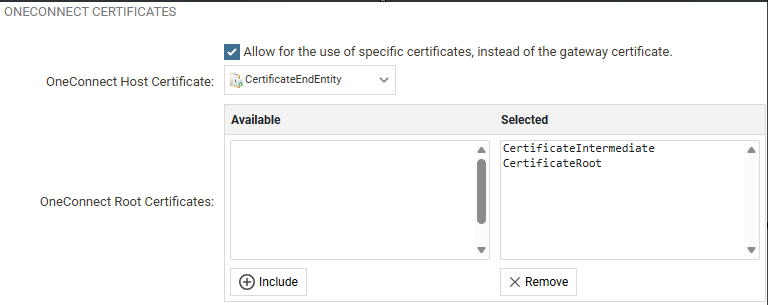
Add the full chain to the firewall, as shown below:
- Set the end-entity certificate as the OneConnect Host Certificate.
- Add the intermediate and root certificates under OneConnect Root Certificates.
- Deploy the configuration.
Verification
Run the following and confirm that all certificates in the chain are listed:
openssl s_client -connect <host>:443 -showcertsThen retest the connection from an Android device.
External tool
Use https://whatsmychaincert.com/ to generate the full chain for the firewall or to test the presented certificate.
Related articles
No related articles found.